

To create a vision board you keep using, pick three to six goals for the year, choose one picture for each, and write one small next action under every picture. Put the board where you look every day, like your phone wallpaper, and book a 10-minute review each month to keep, change or retire each goal.
It’s February, the vision board is still gorgeous, still on the wall (or still your lock screen), and you haven’t looked at it on purpose since the evening you made it with a glass of something and way too many scissors. That’s the normal ending, and it isn’t because you’re lazy, it’s because the board got built and the plan never did.
So this guide on how to create a vision board skips the craft part fast and spends its time on the bit most guides leave out: one next action under every picture, a “what might get in the way” line, and 10 minutes once a month that decide what stays. You’ll see a filled example board, its first review, and what the research actually says. It lives with our other goals and New Year guides in Habits & Lifeplanning.

Read this also:
- Year-End Reflection Questions That Lead to One Clear Change
- A New Year Goal Setting Worksheet That Fits Your Real Week
- A Life Audit That Helps You Choose One Change for 2027
- A Financial Goals Worksheet That Turns a Wish Into a Plan
I’ve made a vision board myself, and the version that actually helped was the boring one: I set it as my phone or desktop wallpaper, so I saw it every single day whether I was in the mood or not.
Is This for You? A 30-Second Check
If you nod at two or more of these, keep reading.
- You’ve made a board before and forgot about it by spring.
- You have a few things you want from 2027 but no plan for any of them yet.
- You’d rather look at a picture than reread a list.
- You can spare 10 minutes once a month (yes, even you).
If you’d rather write goals than picture them, start with a smaller goal-setting plan for 2027 and come back here for the board later.
What Is a Vision Board, Really (and What Is It Not)?
A vision board is a collage of pictures and a few words for the goals you’re choosing this year, kept somewhere you’ll actually see it.
It isn’t a guarantee, a shopping list or a decor project, and here at SPEND • SAVE • LIVE we treat it as a reminder tool, nothing mystical. A mood board collects a look, a vision board collects goals, and the version in this post adds one more thing: the action you’ll take, written right under each picture.
Can a Vision Board Help If You Don’t Know What You Want Yet?
Yes, if you use it to test a direction for about 90 days instead of trying to decide your whole life on one poster board. Pick the one area that feels heaviest right now, not all of them, and if you can’t tell which one that is, a quick life audit will point at it in about half an hour.
Then answer two questions for that area:
- What do I want more of this year?
- What would one small proof of it look like by March?
The answer to the second question is your first picture. Tiny is fine, tiny is actually the point.
How Do You Create a Vision Board in 6 Steps (Paper or Phone)?
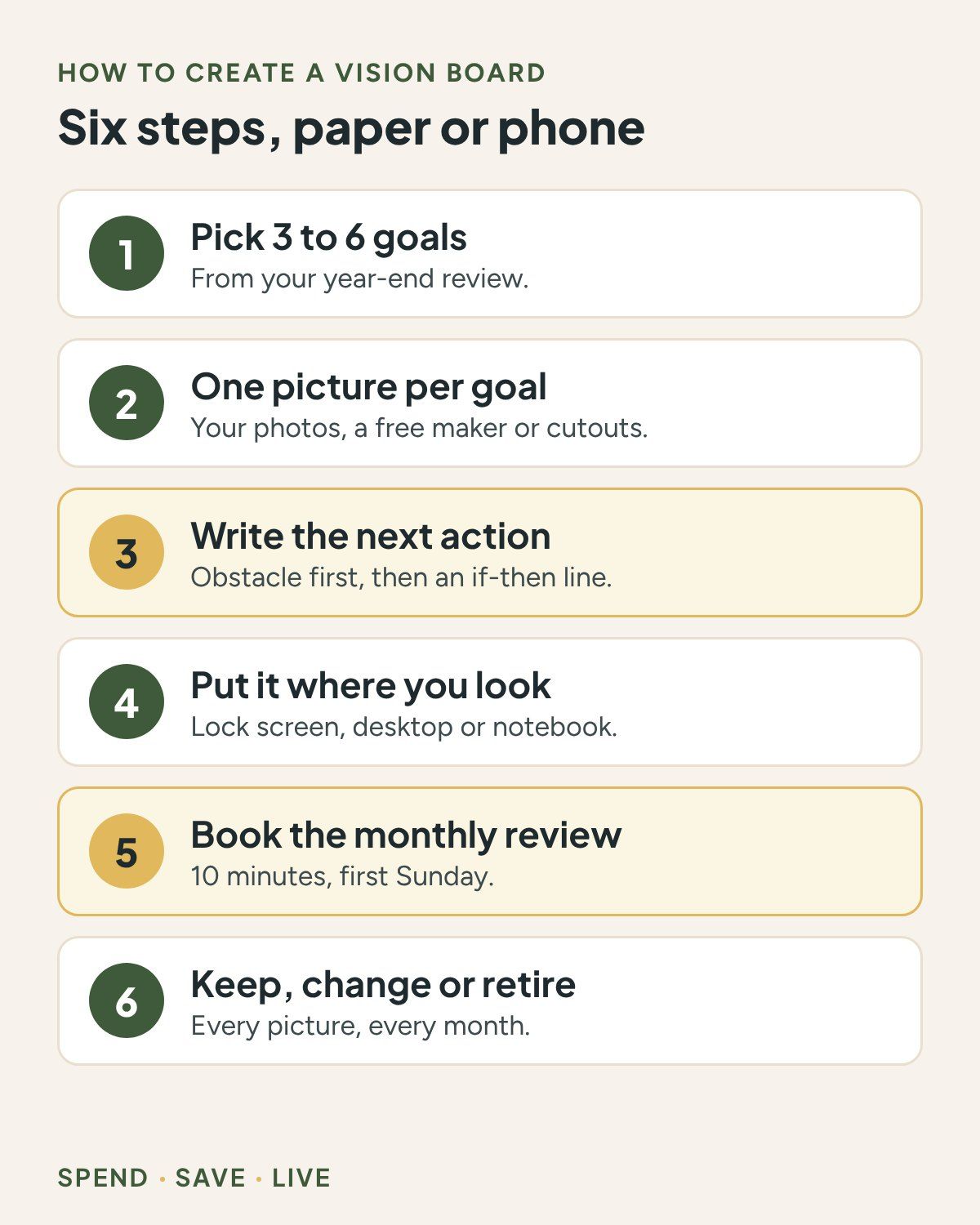
Six steps, and steps 3 and 5 are the ones most guides skip, which is exactly why most boards fade.
- Pick three to six goals. Pull them from your year-end reflection questions if you did them. I don’t do a pile of New Year resolutions, I have long-term goals and each year I pick a few goals that move me closer to them, and three to six is plenty for a board.
- Choose one picture per goal. Your own photos, a screenshot, a free online maker or old magazine cutouts all work. One goal per picture, no crowding.
- Write the obstacle and the next action under each picture. First name what might get in the way, then write one if-then line, like “When I get home on Tuesday, I walk for 20 minutes.” The CFPB’s goal tool puts it simply: break up your goal into small, actionable steps.
- Put it where you already look. Lock screen, desktop, the inside cover of your planner, the fridge you open 14 times a day.
- Book a recurring 10-minute review. In Google Calendar you create the event, then use the “Does not repeat” menu to make it repeat monthly. First Sunday of the month works well.
- At each review, keep, change or retire every picture. More on that script below.
Paper or Digital: Which Vision Board Will You Actually See?
The one you pass every day, and for most of us (guilty) that’s the phone.
| Option | Good for | Watch out |
|---|---|---|
| Paper board or notebook page | People who like cutting, gluing and seeing it on a wall | Easy to stop noticing after a few weeks |
| Phone or computer wallpaper | Seeing it dozens of times a day without trying | Small screen, so keep the words short |
| Private Pinterest board | Collecting pictures before you choose | Only you (and anyone you invite) can see it, so it is easy to forget |
On an iPhone, the wallpaper lives in Settings, then Wallpaper, then Add New Wallpaper, then Photos, per Apple Support. On a Pixel phone, touch and hold an empty spot on the Home screen and tap Wallpapers & style. For a computer, makers like Canva let you download the board as a JPG, PNG or PDF and set that file as your desktop.
- Want text on your wallpaper? Type the action line onto the image inside your maker first, then set the finished image as the wallpaper.
- Looks blurry? Export the board at full size and set that file, not a screenshot of it.
- No magazines? Use your own photos, screenshots or one bold word per tile.
Mine was a wallpaper, and that’s the only reason it worked: I couldn’t avoid it.
Read more: A Printable Habit Tracker With Room for Imperfect Weeks
What Should You Put on a Vision Board So It Points to Action?
One tile per goal, picture on top, obstacle and action underneath, and a picture of the step often beats a picture of the prize.
Keep it to three to six tiles, one area each, for example:
- Money (a savings jar, not a stranger’s mansion)
- Work or study
- Movement
- People you want more time with
- A skill you’re learning
Words help when they’re short verb phrases (“walk Saturdays”) instead of vibe words (“abundance”), and if you want a whole list of those, here are vision board words that point to something you can do. Money goals need a number and a payday next to the picture, which is exactly what a money vision board is for.
What to leave off: other people’s homes, weddings or trips standing in for goals you haven’t actually defined yet.
What Does a Vision Board Example With Next Actions Look Like?
Four pictures, four actions, and about three hours of review across the whole year.
Fictional example (your goals will differ): Jordan is single, gets paid every other Friday starting Fri, Jan 8, 2027, and makes the board on Sun, Jan 3 as a phone lock screen. Here’s the board at its first review on Sun, Feb 7.
| Picture | Next action (if-then) | At the Feb 7 review |
|---|---|---|
| A jar labeled “starter cushion” | Every other payday, $40 moves to savings automatically | 3 paydays, $120 saved: keep |
| Walking shoes | Tue and Thu after work, a 20-minute walk | Only Tuesdays happened: change to Tue and Sat |
| A stack of books | 20 pages on 5 nights a week | About 100 pages a week: keep |
| A course certificate | Enroll in one course by Wed, Mar 31 | Not started: keep, add “pick the course by Mar 7” |
And the obstacle line Jordan wrote under each one:
- Payday spending creeps in, so the transfer is automatic.
- Thursdays run late, so the walk moves to Saturday.
- The phone comes to bed, so the book goes on the pillow.
- Too many course choices, so one gets picked by Mar 7.
The math: $40 x 26 paydays (Jan 8 to Dec 24, 2027) = $1,040. Reviews: 11 monthly check-ins (Feb 7 to Dec 5) x 10 minutes = 110 minutes, plus 20 extra minutes at 4 quarterly reviews = 80 minutes, so 190 minutes for the year. That’s about one long movie. If the money picture is your big one, turn the money picture into a payday plan next.

How Do You Keep Using Your Vision Board After January?
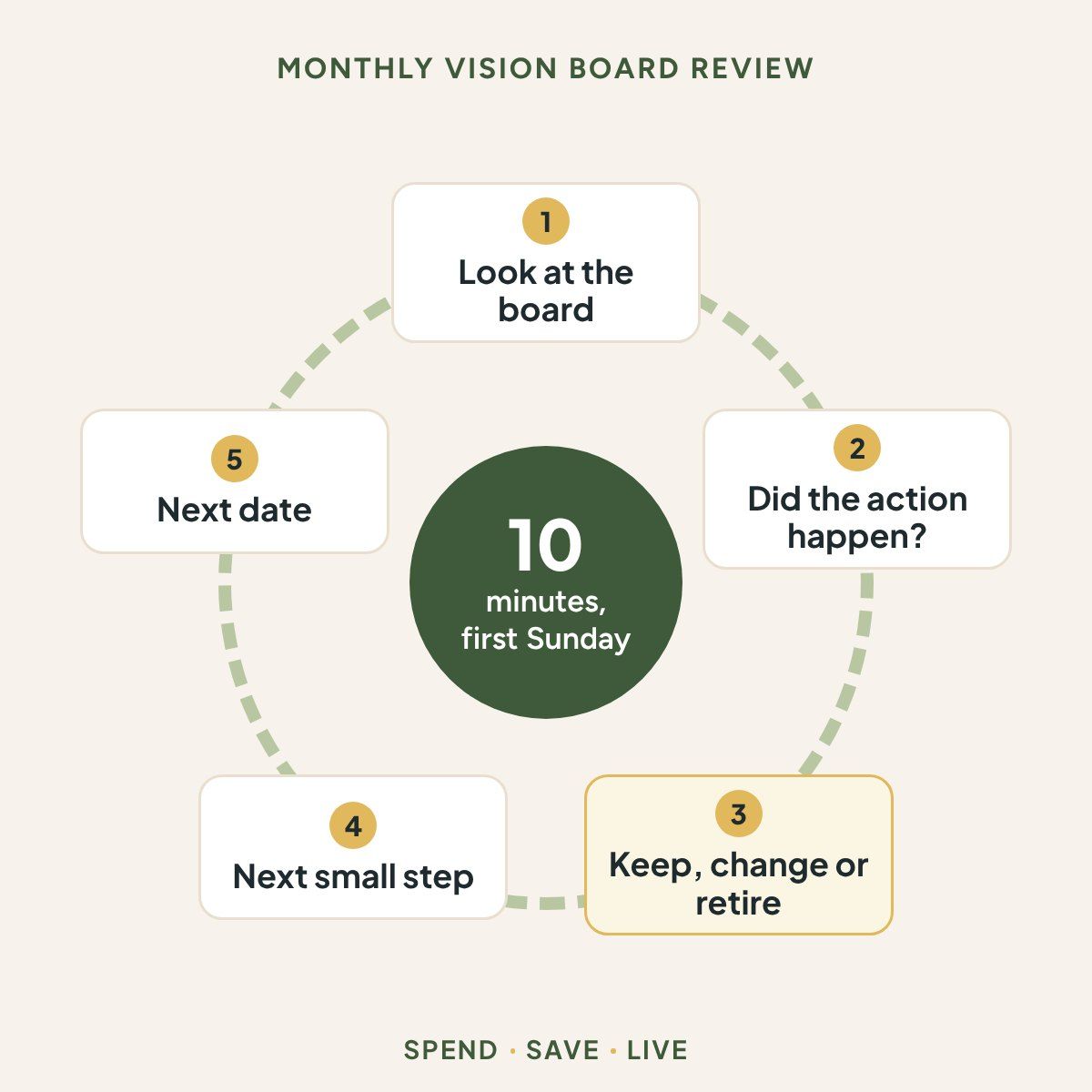
A 10-minute check on the first Sunday of each month, with three choices for every picture.
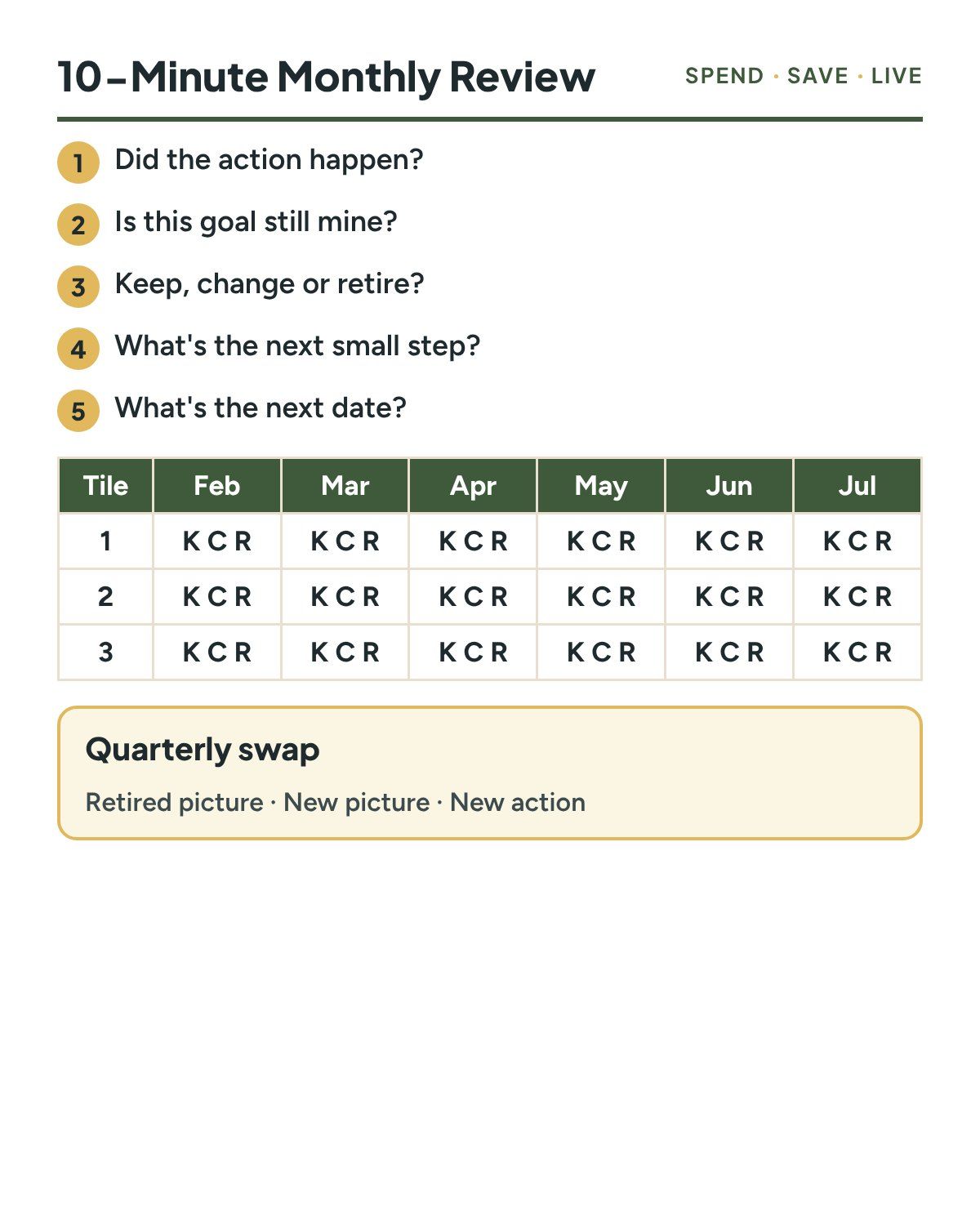
- Look at the board (actually look, not the scroll-past kind).
- Did the action happen? Yes, sort of or no.
- Keep it, change it (smaller, different day) or retire it (done, or no longer yours).
- Write the next small step.
- Put the next date in your calendar.
Every third month (Mar 7, Jun 6, Sep 5 and Dec 5 in 2027), add 20 minutes and swap retired pictures for new ones. That’s the “revolving” board people keep asking about, and if you like planning in quarters, a 90-day goal planner fits right next to it. Weekly actions like Jordan’s walk can live on a printable habit tracker.
How long do you keep a board? The whole year, swapping single tiles as goals finish or change, then start fresh after your year-end review.
My 2026 board was built around one goal: dress better without spending more. I didn’t end up looking like the board (shocking, I know), but I looked a lot better and more like myself, and that’s the real test. Judge the board by the change, not by how closely you match the pictures.
Read more: Year-End Reflection Questions That Lead to One Clear Change
Do Vision Boards Work? What Does the Research Actually Say?
Picturing the goal on its own can actually lower your energy, while pairing it with an obstacle and a plan is what has research behind it.
In four experiments by Kappes and Oettingen (2011), people who were led into positive fantasies about an idealized future showed less energy than people given other kinds of fantasies, and the authors link that low energy to poorer achievement.
If-then plans (“when X happens, I will do Y”) had a medium-to-large effect on reaching goals in a meta-analysis of 94 studies with over 8,000 participants (d = 0.65).
Gollwitzer and Sheeran (2006), as reported by Gollwitzer and Oettingen
The same researchers describe mental contrasting: picture the good future first, then the obstacle standing in the way, then make the if-then plan. That’s the whole reason every tile in this post has a “what might get in the way?” line.
To be fair about it, none of these studies tested vision boards themselves. They tested picturing, planning and obstacles, and the board here is just a handy place to keep all three.
What Can’t a Vision Board Do, and When Should You Get Help?
It can’t fix money that won’t cover the essentials, and it can’t lift a low mood that won’t lift.
- If bills, food or housing are the problem right now, 211 connects you with local help, and our Start Here page lists the money basics first.
- If feeling stuck turns into feeling hopeless, call or text 988, or chat through 988lifeline.org (FCC: 988 Suicide & Crisis Lifeline). Talking to someone is a much better next action than any picture.
What’s in the Vision Board Action Plan Printable?
Two pages that turn each picture into one action and give your monthly review a home.


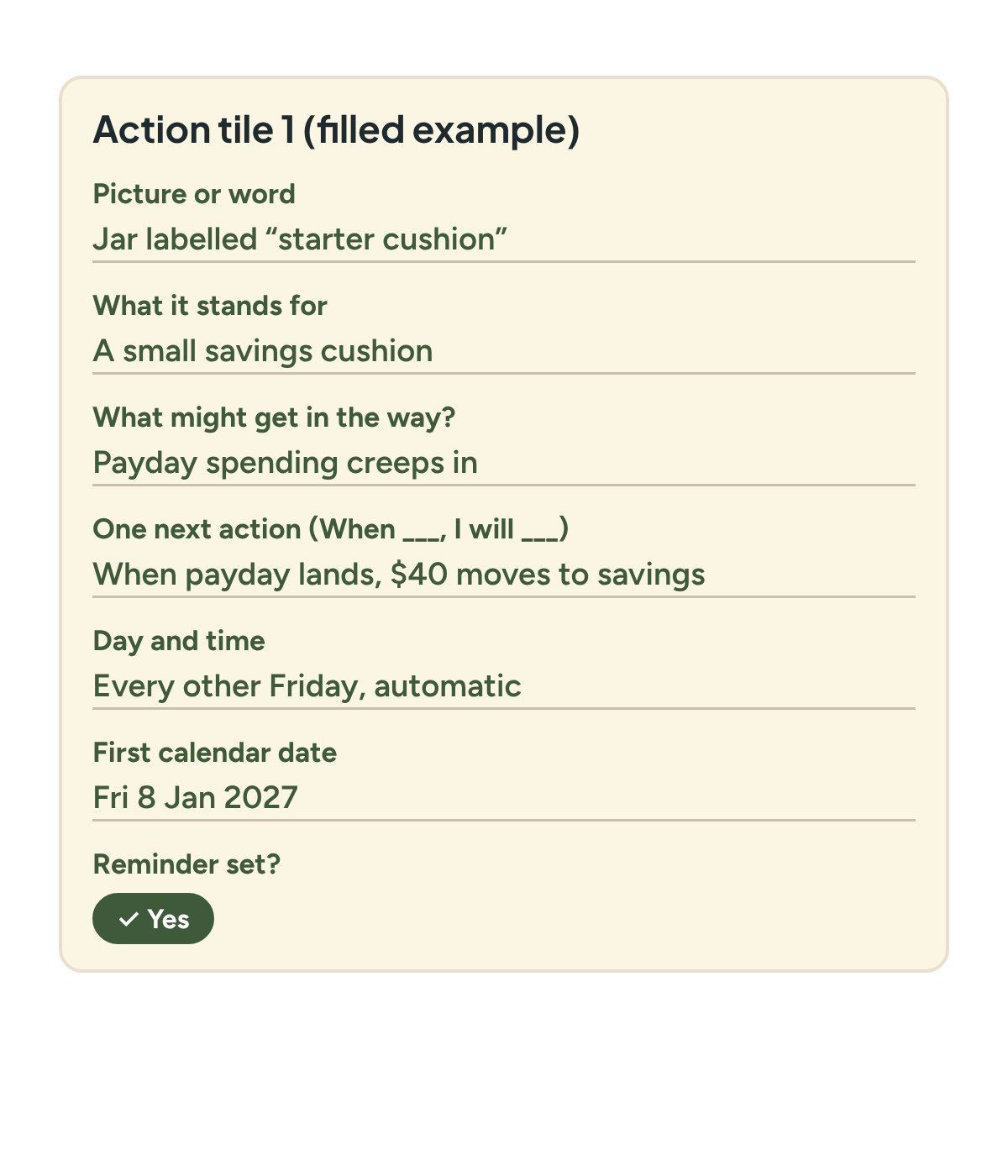
- Page 1: the year, when you made the board, where it lives (paper, phone or computer), your review day, and six action tiles: picture, what it stands for, what might get in the way, one if-then action, day and time, first calendar date and a reminder tick box.
- Page 2: the five review questions, a February to January grid to mark keep, change or retire for each tile, and a quarterly swap box.
Get the full Vision Board Action Plan
The full printable PDF is coming soon. It will be free to SPEND • SAVE • LIVE readers.
Frequently Asked Questions
How do I make my own vision board?
Pick three to six goals, choose one picture for each, write what might get in the way and one next action under every picture, then set a monthly 10-minute review to keep, change or retire each one.
What do you need to create a vision board?
A phone or a sheet of paper, a few pictures and one calendar reminder. You don’t need a kit, a corkboard or a stack of magazines.
How long should you keep a vision board?
Keep it for the year. Swap single tiles as goals finish or stop fitting, and start a fresh board after your year-end review.
Is there a free app for creating vision boards?
Canva and Adobe Firefly both describe their online vision board makers as free. Check each one’s current terms when you sign up, and remember the app matters less than the actions you write under the pictures.
Can ChatGPT make a vision board?
AI image tools can put a collage together for you, but the obstacle and the next action under each picture are still yours to write, and they are the part that does the work.
Do vision boards work?
Picturing a goal on its own isn’t what the research supports. Studies on if-then plans and on pairing the goal with its obstacle are more encouraging, so give every picture an obstacle line and a plan.
Key Takeaways
- A vision board is a reminder, not a plan: every picture needs one next action with a day on it.
- Three to six pictures is plenty, one goal per picture.
- Name what might get in the way before you write the action.
- Put the board where you already look, like your phone’s lock screen.
- Ten minutes on the first Sunday of each month decides what stays, changes or goes.
So, Will You Still Look at It in March?
Back to that pretty board from February nobody looks at. Give it one action line per picture and one recurring 10-minute date, and March-you will at least know what the jar picture wants from you this payday. If you haven’t picked your few goals yet, start with your year-end reflection questions and build the board from the answers.
Sources (checked November 2026)
- CFPB, Putting goals into action
- Kappes and Oettingen (2011), Positive fantasies about idealized futures sap energy, Journal of Experimental Social Psychology
- Gollwitzer and Oettingen, Planning promotes goal striving (reports Gollwitzer and Sheeran 2006)
- Google Calendar Help, Create a recurring event
- Apple Support, Change your iPhone wallpaper
- Pixel Phone Help, Change your wallpaper
- Pinterest Help, Private boards
- Canva, Vision board maker
- Adobe Firefly, Vision board maker
- FCC, 988 Suicide & Crisis Lifeline
- 211.org
- Jordan’s numbers and the 2027 dates: SPEND • SAVE • LIVE calculations, November 2026. Jordan is a fictional example.
Educational content, not financial advice.