

A weekly budget template in Google Sheets is only useful if it tells you what is safe to spend. Take your checking balance, subtract pending charges, unpaid bills, planned transfers, essentials until payday and a small buffer, then divide what is left by the weeks until payday.
Your banking app says $1,420, it’s Monday, a friend just asked about Friday, and you still have no idea if you can say yes (because some of that $1,420 already belongs to the phone company, the car insurance and next week’s groceries, you just can’t see which part). A weekly budget template in Google Sheets should answer exactly that question, and most of the ones out there don’t.
So below you get the one formula that turns a balance into a weekly number, a fictional week that goes slightly wrong on Thursday (like real weeks do), the sheet itself with every formula written out, and how it bends for weekly, biweekly or monthly pay. It sits with the other budget basics in our Spending & Budgeting guides.


Read this also:
- Budgeting for Beginners From the Money You Actually Have
- A Biweekly Budget Template for Bills Between Paydays
- A 2027 Budget Calendar for Bills and Paydays
- How to Start Sinking Funds for Costs You Know Are Coming
I started budgeting in Google Sheets long before I built my own money dashboard (with Claude, these days), and the thing that finally made a sheet useful wasn’t more categories, it was one honest number at the top that told me what was actually mine to spend.
Is This Weekly Budget Template for You?
Probably, if two or more of these sound like your Monday:
- You look at your balance and still kind of guess.
- A bill has bounced, or nearly bounced, right after a week that felt fine.
- You get paid weekly, every two weeks or once a month (all three work here).
- You’d open a Google Sheet once a week, but not every single day.
If you’re already behind on rent or utilities, jump to where to get help first, because a template can’t fix a gap that big and you deserve real help with it.
What Makes a Weekly Budget Template in Google Sheets Actually Useful?
It answers one question every Monday: how much can I spend this week without touching money that’s already promised?
That number is what some banking apps call “left to spend”, and here you get to see exactly how it’s worked out instead of trusting a mystery figure. Most free templates (the ones on Google’s first page, anyway) track what you spent against category limits, which is useful later, but they never start from the balance you can actually see in your account.
You’ll also see this called a Google Sheets weekly budget template, which is the same thing and the same sheet. And if you’ve never built a budget before, start with budgeting from the money you actually have and come back here once the bills are listed.
How Do You Work Out What Is Safe to Spend This Week?
Start with your checking balance, take out five things, then divide what’s left by the weeks until payday.
- Pending card charges that haven’t posted yet.
- Unpaid bills due before your next payday, counted by due date, not averaged over the month.
- Planned transfers, like the money going to savings.
- Essentials per week (groceries, gas or transit) times the weeks left.
- A small buffer that you never spend.
Safe to spend this week = (balance minus pending, unpaid bills, transfers, essentials and buffer) divided by weeks left.
Why bother holding bills back when the money is sitting right there? Because a balance that covers today can still fall short when a bill posts, and the CFPB describes an overdraft as what happens when you don’t have enough money in your account to cover a transaction. The CFPB’s bill calendar tool also suggests marking online and in-person payments two or three days before the due date (seven for mail), so a bill due right after payday may need to come out of this paycheck.
If your due dates live in five different apps and one email, line up your bill due dates on one calendar first, it makes the “unpaid bills” line take about a minute.
Read more: A 2027 Budget Calendar for Bills and Paydays
What Does One Real Week Look Like? (Meet Dana, Who Is Fictional)
Dana can spend $205 this week, not $1,420.
Dana is a made-up example with made-up numbers (your costs will differ, and none of these are “typical”). She’s single, paid monthly, her next payday is Friday, February 26, 2027, and she does her check on Monday, February 8.
| Line | Amount | Note |
|---|---|---|
| Checking balance | $1,420 | Mon Feb 8 |
| Pending card charges | minus $46 | not posted yet |
| Unpaid bills before payday | minus $249 | phone $55, streaming $16, car insurance $118, internet $60 |
| Savings transfer | minus $50 | Mon Feb 15 |
| Essentials, 3 weeks | minus $360 | groceries $85 + gas $35 a week |
| Buffer | minus $100 | stays put |
| Safe to spend this week | $205 | $615 ÷ 3 weeks |
The math, in one line: $1,420 minus $46, $249, $50, $360 and $100 leaves $615. February 8 to February 26 is 18 days, which rounds up to 3 weeks, and $615 divided by 3 is $205.
That $118 car insurance bill is the one that usually ambushes people (yearly bills used to catch me off guard too), so if it shows up every six months, give it a sinking fund for the car insurance and it stops being a surprise at all.
What’s Inside the Weekly Safe-to-Spend Sheet?
One Google Sheet with three tabs: Setup and result, Bills, and a Daily log.


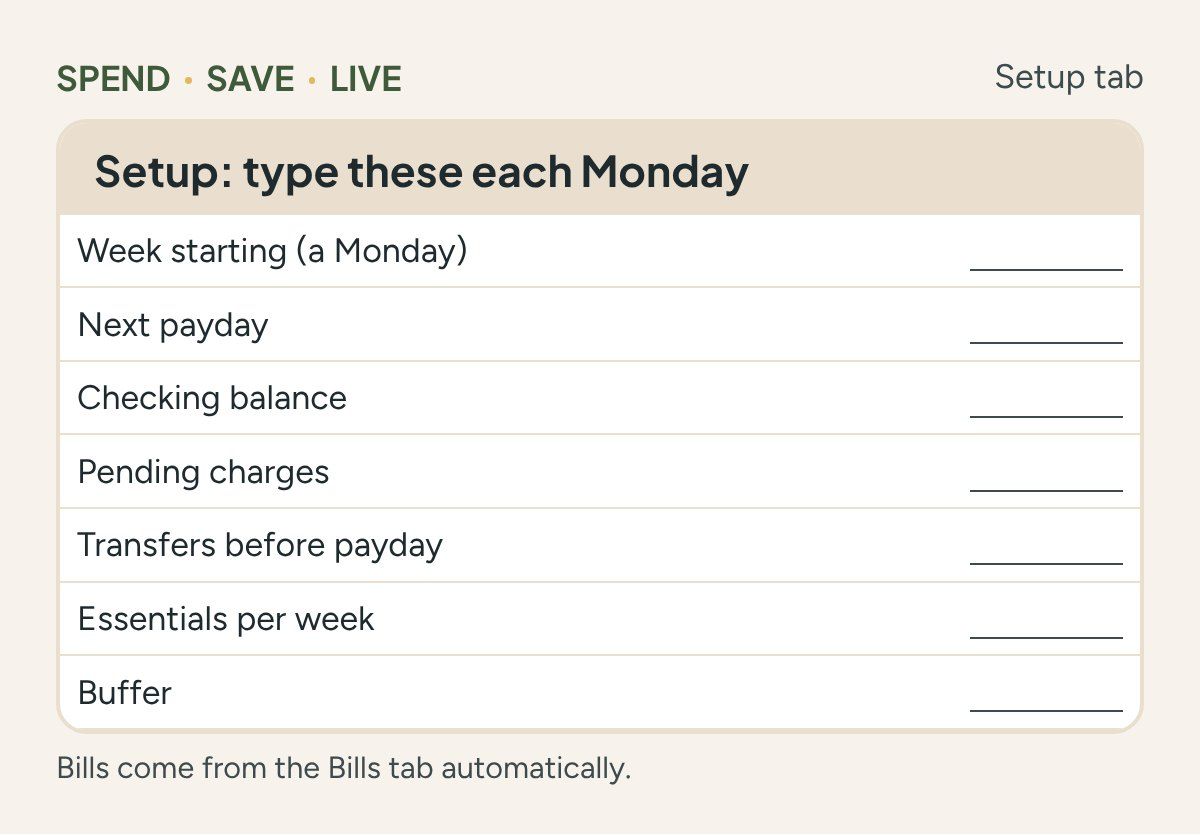
- Setup and result: the date the week starts, your next payday, your balance, pending charges, transfers, essentials per week and your buffer, plus the result box with weeks left and safe to spend.
- Bills: bill, due date, amount and a Paid checkbox.
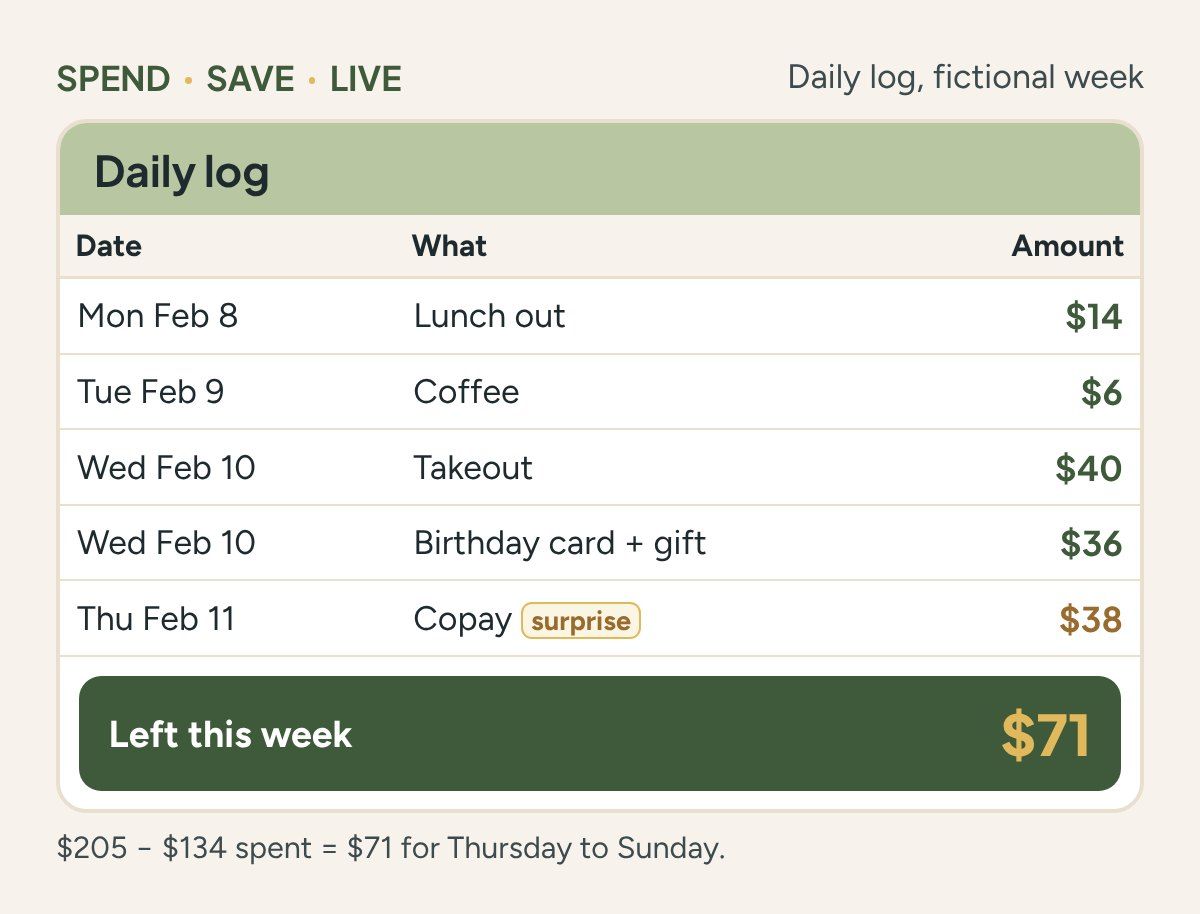
- Daily log: date, what, amount, and whether it was planned or a surprise, with “left this week” counting down.
A one-page PDF of the same layout is on its way for people who like paper. Excel isn’t covered here.
Get the full Weekly Safe-to-Spend Sheet
The full printable PDF is coming soon. It will be free to SPEND • SAVE • LIVE readers.
What If Something Unplanned Shows Up on Thursday?
It comes out of this week’s number, and Monday’s recount sorts out the rest.
- Thursday, February 11: Dana has spent $96 so far and gets a $38 copay she didn’t plan for. $205 minus $134 leaves $71 for Thursday to Sunday.
- Monday, February 15, calm weekend: she spends $60, so the week ends $11 under. The recount gives her $210 a week for the last two weeks.
- Monday, February 15, busy weekend: she spends $110, so the week ends $39 over. The recount gives her $185 a week instead.
Nobody gets told off here (least of all by a spreadsheet). An over week just gets spread across the weeks that are left, which is the same carry-it-forward idea as the CFPB’s cash flow budget tool, where each week’s ending balance becomes the next week’s starting point. If a few weeks in a row go over, here’s how to get back on track after an over week.
How to Build the Sheet in Google Sheets (Without Being a Spreadsheet Person)
You need one Setup block, one Bills list with checkboxes and one result cell, and that’s honestly it.
- Open a blank Google Sheet and name three tabs: Setup, Bills and Log.
- On Setup, type the labels in column A and your numbers in column B: week starting (B2), next payday (B3), checking balance (B4), pending charges (B5), transfers (B7), essentials per week (B8) and buffer (B10).
- On Bills, use columns A to D for bill, due date, amount and paid. Select the Paid column and choose Insert, then Checkbox.
- Paste the formulas below into B6, B9, B11, B12 and B13.
- Optional: select B13 and use Format, then Conditional formatting, with a custom formula of =B13<0, so “left this week” turns brown when you’re over.
Unpaid bills before payday (B6)
=SUMIFS(Bills!C:C,Bills!D:D,FALSE,Bills!B:B,"<"&B3)
Weeks left (B9)
=MAX(1,ROUNDUP((B3-B2)/7,0))
Safe to spend this week (B11)
=MAX(0,ROUNDDOWN((B4-B5-B6-B7-B8*B9-B10)/B9,0))
Spent this week (B12)
=SUMIFS(Log!C:C,Log!A:A,">="&B2,Log!A:A,"<"&(B2+7))
Left this week (B13)
=B11-B12
The checkbox bit is the part people get stuck on. An unticked box counts as FALSE in a formula, so SUMIFS only adds the bills you haven’t ticked yet that are due before payday. Tick a bill once it’s paid and it drops out of the number, and don’t delete paid rows, because next month you’ll want that history.
My own old Google Sheet was super simple: one block per month and a paid or done status on every row. This one works the same way, just weekly. And if you’re not sure what belongs on the Bills tab, these budget categories you keep forgetting will jog your memory.
How to Use It Every Week in About 15 Minutes
Recount on Monday, tick bills as they go out, and log spending as you go.
- Monday: type in your balance and pending charges, tick anything that got paid, and read the number.
- During the week: add one row to the Log tab for each purchase, and “left this week” counts down by itself. That’s the daily budget part, without a daily budget ritual.
- On the go: Google Sheets has apps for Android and iPhone, so the log can live on your phone.
I pay all my bills on payday and then do a weekly money check that takes me about 30 minutes. If you want the full picture of where it went, track where the money went with a spending tracker next to this sheet.
Does This Work If You’re Paid Weekly, Every Two Weeks or Monthly?
Yes, only the “weeks left” number changes.
| Pay schedule | Weeks left | What changes |
|---|---|---|
| Weekly | 1 | Hold back this week’s bills and essentials, then put a share aside for bills due after payday |
| Every two weeks | 1 or 2 | The second week gets whatever the first week didn’t use |
| Monthly | 3 to 5 | More weeks to split, so Monday’s recount matters more |
If you’re paid every other Friday, the biweekly budget template maps each bill to a paycheck, which pairs nicely with this. Paid weekly but billed monthly? Here’s how to budget weekly pay for monthly bills.
Read more: A Biweekly Budget Template for Bills Between Paydays
What a Weekly Budget Can’t Fix, and Where to Get Help
If the number is $0 week after week, the problem is income or bills, not the template.
- The CFPB’s prioritizing bills tool puts it plainly: “Don’t ignore bills you can’t pay.” It walks you through which bills to cover first, like housing, income, insurance and court-ordered payments.
- 211 connects you with local help for bills, food and housing.
- The National Foundation for Credit Counseling lists nonprofit credit counselors (877-360-6322).
New here? Start Here has the basics in order.
Frequently Asked Questions
How do I make a budget plan in Google Sheets?
List your bills with their due dates, add your essentials and a small buffer, then use one formula that divides what’s left by the weeks until payday. The formulas above are everything you need for a weekly version.
How do I use Google Sheets for budget tracking?
Log each purchase as one row with the date, what it was and the amount, and let a “left this week” cell subtract it for you. Then do a quick recount every Monday.
How do I track spending in Google Sheets?
Use one row per purchase with the date, what and amount, and total them by week or category with SUMIF or SUMIFS. To see where it all went, a spending tracker in Google Sheets helps. Automatic bank imports are a different setup that this sheet doesn’t cover.
How do I budget when getting paid weekly?
Your weeks left is 1, so hold back this week’s bills and essentials first, then set aside a share for bills that are due after your next payday. The rest is safe to spend. More on that in budgeting weekly pay for monthly bills.
Is it better to budget weekly or monthly?
Plan monthly and spend weekly. A monthly plan catches every bill, and a weekly number is much easier to stick to on a Wednesday. A monthly budget planner and this sheet work well together.
Can I use a weekly budget template on my phone?
Yes. Google Sheets has apps for Android and iPhone, so you can log purchases on your phone and do the Monday recount wherever it’s easiest.
Key Takeaways
- Your balance isn’t spendable until bills, transfers and essentials before payday are held back.
- Safe to spend this week is what’s left divided by the weeks until payday.
- A midweek surprise comes out of this week’s number, and Monday’s recount spreads any overspend out.
- The sheet needs a handful of inputs and a few formulas, and the rest is ticking boxes.
The Number That Lets You Say Yes on Friday
Back to that $1,420 and the friend asking about Friday: with ten minutes and this sheet you’d know it’s really $205 for the week, which is a yes to dinner and a no to the second round (or a yes to both and a quieter weekend, your call). If the bills list feels like the hard part, the 2027 budget calendar is a good next stop.
Sources (checked November 2026)
- CFPB, What can I do if my bank charged me a fee for overdrawing my account?
- CFPB, Bill calendar tool
- CFPB, Cash flow budget tool
- CFPB, Prioritizing bills tool
- Google Docs Editors Help, Add and use checkboxes
- Google Docs Editors Help, SUMIFS function
- Google Workspace, Checkbox values in formulas
- Google Docs Editors Help, Conditional formatting
- Google Docs Editors Help, Access Sheets on any device
- 211.org
- National Foundation for Credit Counseling
- Dana’s numbers and dates: SPEND • SAVE • LIVE calculations, November 2026, formulas tested with the example numbers. Dana is a fictional example.
Educational content, not financial advice.